
ChatGPT for Seniors: The First 5 Things I'd Do After 60
Your grandkids use it. The news talks about it every night.
But nobody showed you where to start.
So here it is. Five things. Shown on my own screen, with the free account.
It costs nothing. And you don’t have to be good with computers.
ChatGPT for seniors starts with a free account at chatgpt.com. Then do five things: talk instead of typing, ask it to explain confusing words, paste in any odd text and ask if it's a scam, and use it for everyday help. Never type private numbers, and check money or health answers with a real person.

I retired at 62. That was three years ago.
Lisa and I had worked from home since 1996. Then we stopped. No videos. No posts.
While I was retired, I started fiddling with ChatGPT. I got pretty good at it.
Then with Claude, a helper just like it. Claude ended up helping me build every one of the free retirement calculators on this site.
Me. A guy in reading glasses.
So when I tell you that you don’t need to be good with computers, I mean it.
How Many People Over 60 Use ChatGPT?
Fewer than you’d think. Pew Research Center asked in early 2026. Only 23% of Americans 65 and older say they ever use AI chatbots like ChatGPT, Gemini or Copilot. Among all adults, it’s 49%.
Less than one in four.
ChatGPT on its own is even lower. In Pew’s 2025 survey, “10% of those 65 and older report ever using ChatGPT.”
So if you’ve never tried it, you’re not behind.
You’re normal.
And here’s the good news. The ones who start now get a real head start on their friends. Same as the first person on the block with a microwave.
What Is ChatGPT, in Plain Words?
ChatGPT is a helper you type or talk to. You ask a question. It writes back in plain words. It’s made by a company called OpenAI, and the basic version is free at chatgpt.com.
Think of a new hired hand.
Strong. Fast. Never gets tired. Read every book in the library.
But he’s new on the job. So sometimes he guesses. And when he guesses, he says it like he’s sure.
You’d still let him help. You’d just check his work before you sign off on it.
Meet ChatGPT.
Here’s how it stacks up, plain and simple:
| What you care about | The answer | How it works | What it costs you |
|---|---|---|---|
| Money | No change | The free plan is $0. Nothing to install on a computer. | Ads may show on the free plan. No ads costs $20 a month. |
| Getting it right | Can hurt | It writes smooth answers, even wrong ones | A second look at anything about money, health or the law |
| Time | Saves | One question replaces a pile of search results you’d read yourself | A few tries before it feels natural |
| An edge | Real, for now | Fewer than one in four people 65 and older use AI chatbots | Nothing but practice |
Bottom line: it saves you time and costs nothing to start, but you have to check its work.
Thing 1: How Do You Get a Free Account?
Go to chatgpt.com and click “Sign up for free.” You can sign up with Google, Apple, your phone number or any email address. It may send you a code. Type it in, and you’re done. You must be at least 13, per OpenAI’s terms.
Here’s the screen I saw:
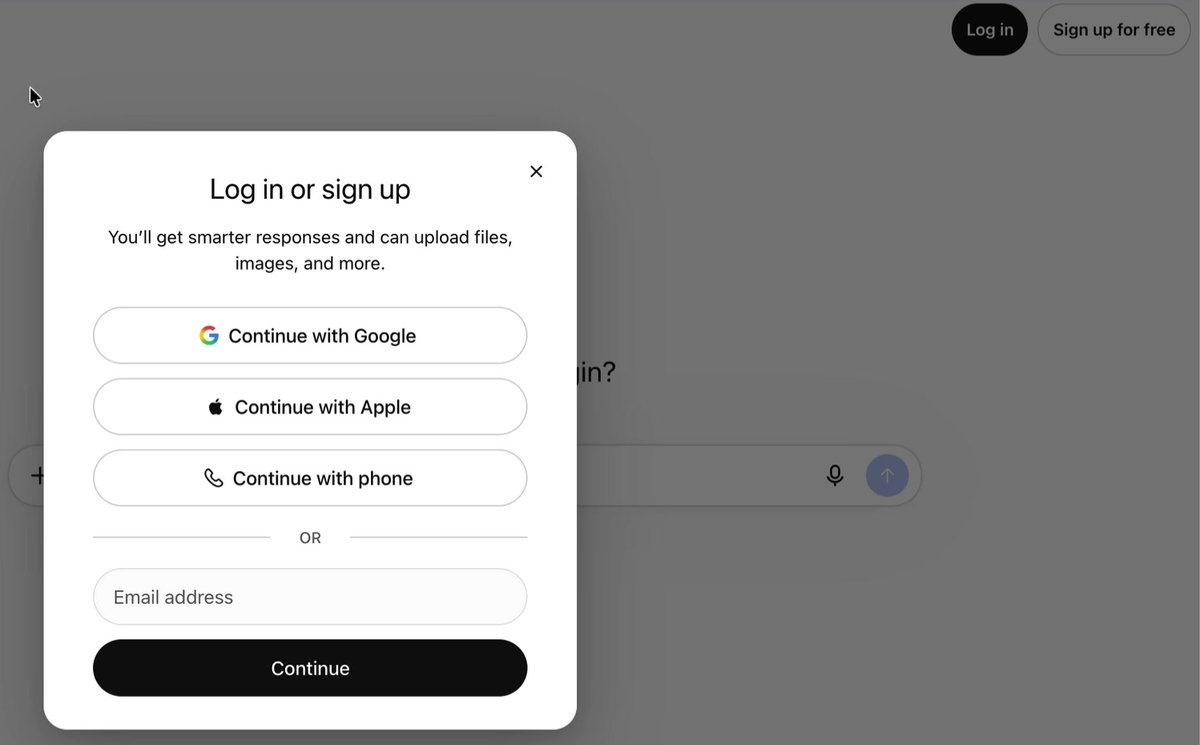
That’s it. You’re in.
Now, it may ask you to upgrade.
You don’t have to. Here’s what each plan costs today:
| Plan | Price | Ads? | Who it’s for |
|---|---|---|---|
| Free | $0 | May show ads | Everybody starting out |
| Go | $8 a month | May show ads | More use, low price |
| Plus | $20 a month | No ads | People who use it every day |
| Pro | $100 or $200 a month | No ads | Heavy business use |
Start free. Stay free until it annoys you. Most people never get there.
Thing 2: Can You Talk to ChatGPT Instead of Typing?
Yes. On a computer, click the little microphone in the box. Its label says “Dictate.” Talk, then click it again, and your words show up as text. On a phone, the free ChatGPT app lets you talk back and forth out loud. The free plan gives you limited voice time each day.
Typing is slow.
Talking is fast.
And your fingers will thank you.
One warning about the phone app. Copycat apps exist in every app store. Before you tap “Get,” look at who made it:
- On an iPhone, the Apple App Store lists the maker as OpenAI OpCo, LLC.
- On Android, Google Play lists the maker as OpenAI.
Any other name? Walk away.
Thing 3: Ask It to Explain Things
This is where ChatGPT earns its keep. A letter from Medicare. A word your doctor used. A line on a bill. Ask what it means. Then add two short instructions, and the answer comes back short and clear instead of a wall of words.
Here’s the trick. Copy it and change the question:
What is a deductible? Use simple words. Keep it to three sentences.
Those last two parts are the secret.
“Use simple words.” “Keep it short.”
Add them to any question you ask.
In the video, I asked it about the 2027 Social Security raise. Here’s what came back:
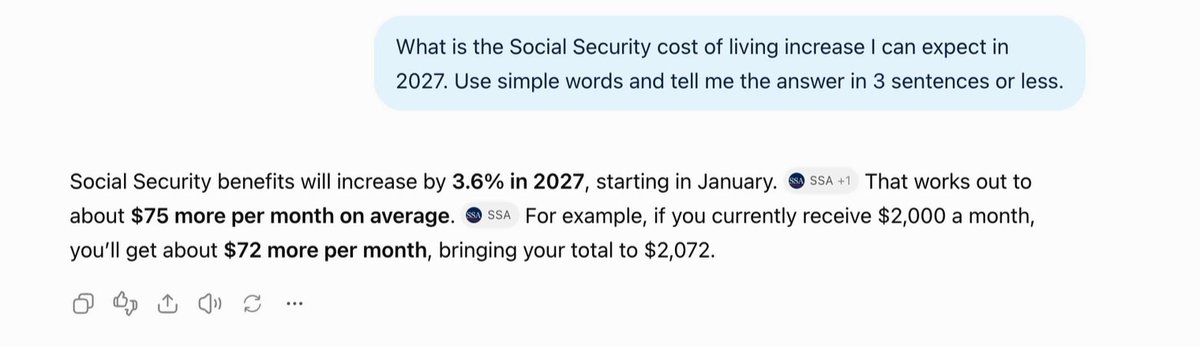
It got it right. It even showed where it looked. The little “SSA” tags mean it used Social Security’s own pages.
I checked anyway. Social Security’s announcement says the same thing. Want the whole story on that raise? I broke it down in what the 2027 COLA really leaves you.
Here’s another one from my own house.
One day I couldn’t find the water shut-off valve. So I gave ChatGPT the builder’s name and my address, and asked where the shut-off valve was.
It told me. Someplace I’d never have looked.
Thing 4: Ask, “Is This a Scam?”
Before you click a link in any odd text or email, paste the message into ChatGPT and ask, “Is this a scam? What are the warning signs?” It will point out the red flags. Take out your own name and numbers first, and treat its answer as a second opinion, not the final word.
This one matters more than the other four put together.
The FBI’s 2025 crime report counted 201,266 complaints from people 60 and over. They reported losing $7.748 billion in one year. The average loss was $38,500.
Let that sink in.
A new truck. Gone. On average.
And the scams don’t only come by text. The FTC says social media was the most reported way scams reached people in their 60s and 70s who lost money. For people 80 and over, phone calls cost the most.
Here’s a real one. It landed in my spam folder the day I recorded the video. So I pasted it in:
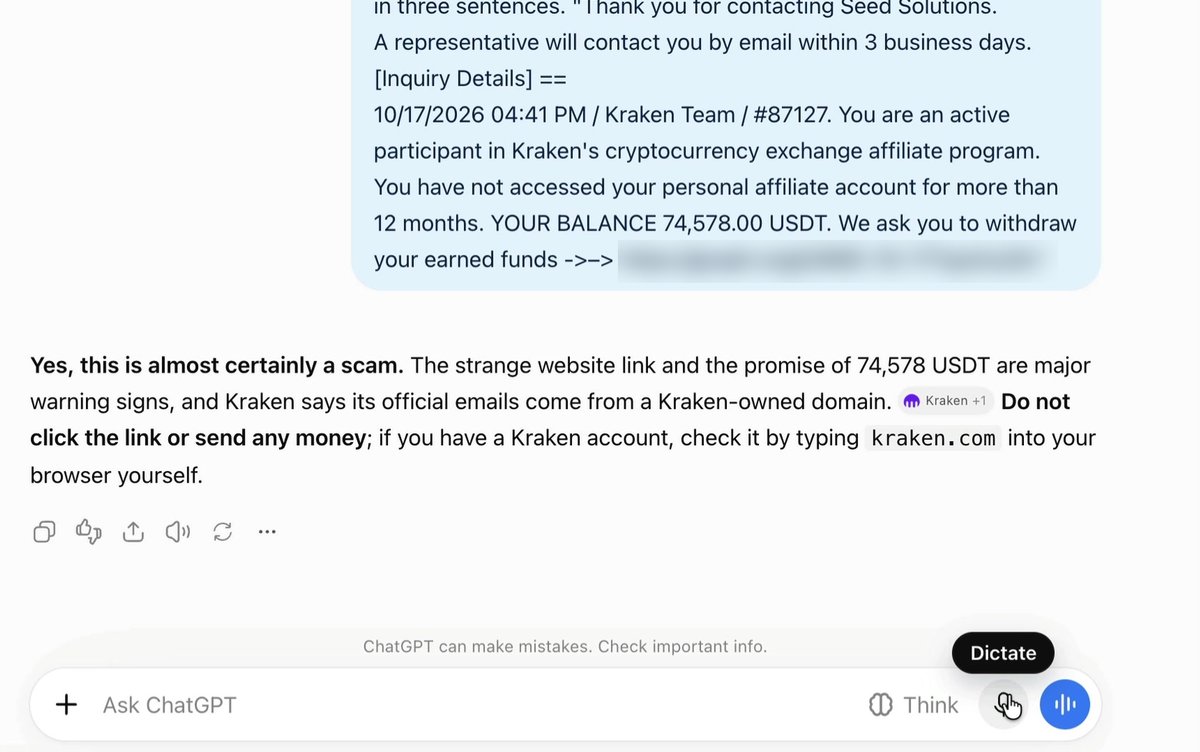
“Yes, this is almost certainly a scam.”
It even told me the safe move: don’t click anything, and type the real website into the browser yourself.
Here’s the prompt. Copy it, then paste the message under it:
Is this a scam? What are the warning signs? Use simple words.
Three rules for scam checks:
- Take out your own details first. Your name, your address, any account numbers.
- Never call the number in the message. Call the number on the back of your card, or on a bill you already have.
- Report scam texts. The FTC’s advice is plain: “Copy the message and forward it to 7726 (SPAM).”
ChatGPT gives you a second opinion. You still make the call.
Thing 5: Let It Help With Everyday Stuff
ChatGPT is handy for the small jobs that eat up a morning: questions for the doctor, a note for a grandchild, dinner from leftovers. Ask, read the answer, and ask again if it isn’t right. Say “make it shorter” or “make it friendlier.” It never gets tired of you.
Here are three to try. Change the details to fit you:
Write 5 questions I should ask my doctor about my sore knee. Use simple words.
Help me write a short birthday note for my grandson. He's 12. He loves baseball.
I have half a roasted chicken, white rice, broccoli and a soft cucumber. What can I make for dinner? Use simple words and keep it under three sentences.
I tried the dinner one on camera, talking instead of typing. Look at what showed up under the answer:
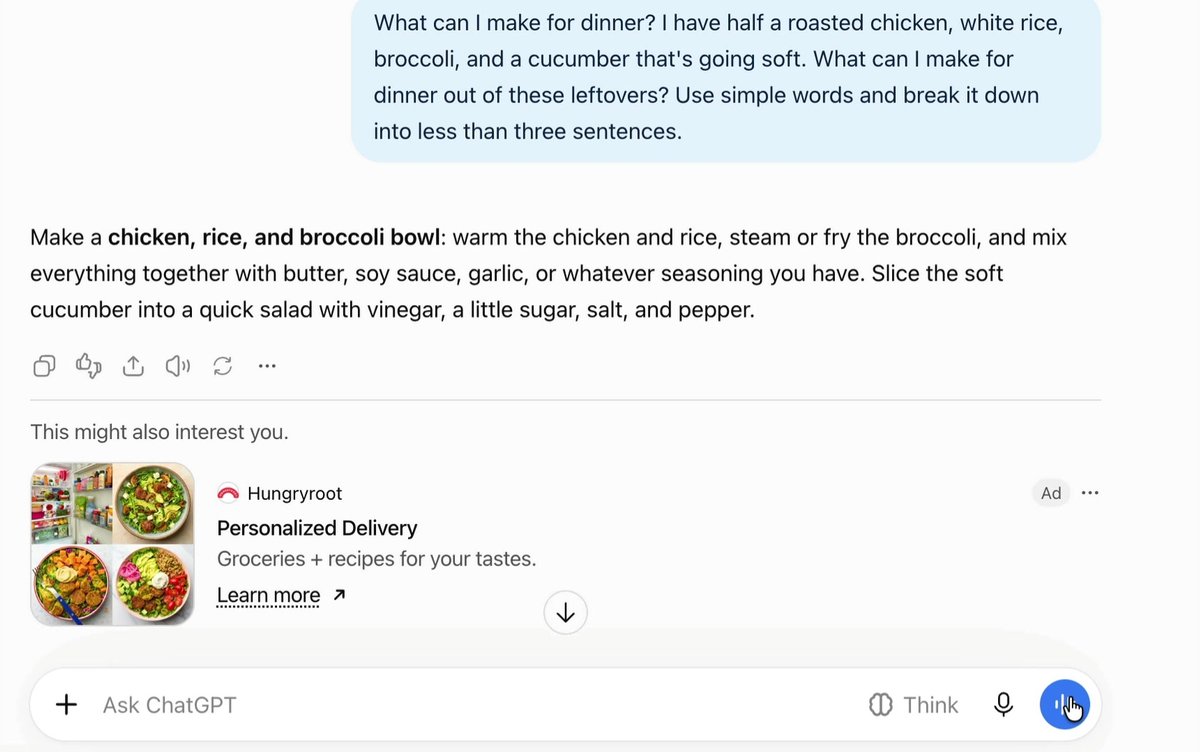
That box at the bottom is an ad.
OpenAI is upfront about it. Its help page says, “Ads may appear for users on the Free and Go plans. Plus, Pro, Business, Enterprise, and Edu accounts will not have ads.”
So the ads aren’t part of the answer. You can skip them. Or pay OpenAI $20 a month for Plus and they go away.
Rule 1: Never Type Private Numbers
Never type your Social Security number, bank or card numbers, PINs or passwords into ChatGPT. It doesn’t need them for anything. A good test: if you wouldn’t write it on a postcard, don’t type it into a chat.
Two settings help, too.
Turn off training. Click your profile picture, then Settings, then Data Controls. Turn off “Improve the model for everyone.” Now your chats won’t be used to train it.
Use a Temporary Chat for anything personal. Open a new chat and click “Temporary” at the top right. OpenAI says those chats are deleted from its systems after 30 days.
Neither setting makes it safe to type your Social Security number.
Nothing does.
Rule 2: It Can Be Wrong, and Sound Sure
ChatGPT can be wrong, and it sounds just as sure when it is. OpenAI says so itself. So for money, health, taxes or legal questions, use ChatGPT to get smarter about the question. Then let a real person or an official website give the final answer.
OpenAI’s own help page warns that ChatGPT “might sound confident” even when it’s wrong. It says this is “often referred to as a hallucination.”
It can make up quotes. It can make up studies. It can even make up sources.
Even the chat box says so. Look at the bottom of my screen in the scam example: “ChatGPT can make mistakes. Check important info.”
Here’s how I handle it:
- Ask it to show its sources. Then click one and read it.
- Tell it not to guess. Add: “If you’re not sure, say so. Don’t make anything up.”
- Go to the official site for anything that counts. SSA.gov for Social Security. Medicare.gov for Medicare. Your doctor, your lawyer or your tax preparer for the rest.
Where ChatGPT Lets You Down
It’s not perfect. Here’s where it falls short for people our age:
- It’s confident when it’s wrong. This is the big one. It never says “um.”
- The free plan has ads now. They’re marked, but they’re right under the answer, and some will be selling something you don’t need.
- Free voice time is limited. Talk a lot, and you’ll hit the daily cap.
- It doesn’t know you. It can explain Medicare Part D. It can’t tell you which plan is right for your prescriptions. Only Medicare’s plan finder or a real person can do that.
- Things change fast. Buttons move. Names change. If a button in this post looks different on your screen, look for the same word nearby.
Who This Is For, and Who It Isn’t
It’s for you if:
- You have a question that’s been bugging you for years.
- You’d like a second opinion before you click a link.
- You’re tired of typing on a tiny phone screen.
It’s not for you if:
- You want someone to make money or health decisions for you. It can’t, and it shouldn’t.
- You won’t check anything it says. Then it’s a risk, not a helper.
Your First Week With ChatGPT
Here’s the plan. Small steps. The first one takes five minutes:
- Today: go to chatgpt.com and click “Sign up for free.” Use the email you already check.
- Today: turn off “Improve the model for everyone” under Settings, then Data Controls.
- Tomorrow: ask one question out loud using the microphone. Anything at all.
- This week: ask it to explain one word or letter that’s confused you. Add “Use simple words. Keep it to three sentences.”
- The next odd text you get: paste it in, take out your details, and ask “Is this a scam?” before you touch the link.
- The step most people skip: check one answer against an official site. Do it once, and you’ll know how much to trust it.
Before you know it, you’ll be the one teaching the grandkids.
Want to Earn a Little Online?
It’s why I came back.
Prices kept climbing. A couple of hours a week, making a few extra dollars online, didn’t sound like a bad idea. ChatGPT and Claude did a lot of the work I’d have had to learn myself: building pages, writing emails, making slides like the ones in my video.
Rather just enjoy retirement? Good for you. Start with the free calculators and the senior discounts list. Both cost nothing.
Curious? HBA’s Turnkey system runs the page, the email list and the follow-up emails for you. Fair warning: in the 12 months to 30 September 2026, HBA’s median active affiliate earned $0. It takes work, time and a little money first.
Bless and be blessed,

Sources
- Pew Research Center, How opinions and use of AI differ by age (survey of 17 to 23 February 2026) - checked Oct 17, 2026
- Pew Research Center, 34% of U.S. adults have used ChatGPT (survey of 24 February to 2 March 2025) - checked Oct 17, 2026
- ChatGPT pricing page, plans and what the free plan includes - checked Oct 17, 2026
- OpenAI, What is ChatGPT Plus? ($20 a month) - checked Oct 17, 2026
- OpenAI, What is ChatGPT Pro? ($100 and $200 tiers) - checked Oct 17, 2026
- OpenAI, Our approach to advertising and expanding access (ChatGPT Go in the US, $8 a month) - checked Oct 17, 2026
- OpenAI Help Center, ads in ChatGPT (Free and Go plans only) - checked Oct 17, 2026
- OpenAI Help Center, Does ChatGPT tell the truth? - checked Oct 17, 2026
- OpenAI Help Center, Data Controls FAQ (Improve the model for everyone) - checked Oct 17, 2026
- OpenAI Help Center, Temporary Chat FAQ - checked Oct 17, 2026
- OpenAI Help Center, Voice Mode FAQ (limited voice on the free plan) - checked Oct 17, 2026
- OpenAI Terms of Use (age 13 and up) - checked Oct 17, 2026
- ChatGPT on the Apple App Store, developer OpenAI OpCo, LLC - checked Oct 17, 2026
- ChatGPT on Google Play, developer OpenAI - checked Oct 17, 2026
- FBI Internet Crime Complaint Center, 2025 IC3 Annual Report (people 60 and over) - checked Oct 17, 2026
- FTC Data Spotlight, reported losses to scams that start on social media (April 2026) - checked Oct 17, 2026
- FTC Consumer Advice, How to recognize and report spam text messages - checked Oct 17, 2026
- HBA Earnings Disclosure Statement, 12 months 1 October 2025 to 30 September 2026 - checked Oct 17, 2026
- Screenshots: my own free ChatGPT account, recorded for the video on 17 October 2026 - checked Oct 17, 2026