
GMass Review 2026: What The Extra $30 A Month Actually Buys
GMass costs $29.95, $39.95 or $59.95 a month in 2026. The first $10 step adds automated follow-up sequences. The second $20 adds one feature, Inbox Rotation, which spreads a campaign across several Gmail accounts. Send from one inbox and that $20 buys you nothing.
My own GMass use was on a capped free account GMass does not offer today, so I’m not going to describe running 10,000 sends a day through it. What I can do is read the pricing page markup, read the terms, read what happened to people who pushed it hard, and tell you where the numbers stop making sense. Full disclosure
Trying to work out why GMass costs $29.95 at one tier and $59.95 at another, and what that extra thirty dollars actually buys?
GMass runs $29.95, $39.95 and $59.95 a month in 2026. The first $10 step buys automated follow-up sequences. The second $20 buys one feature: Inbox Rotation, which spreads a single campaign across several connected Gmail accounts. Send from one inbox and that $20 buys you nothing at all.
That’s the whole review.
Everything below is the detail, the arithmetic, and the part where I tell you what the marketing pages leave out.
What Does GMass Cost In 2026?
Prices rose on 1 January 2026. GMass called it the third increase in ten years, announced it in advance, and let existing customers lock the old rate by moving to annual first. Two increases in a decade with a way out is better behavior than most of this category manages.
Credit where it’s earned.
| Plan | Monthly | Annual | Annual works out at |
|---|---|---|---|
| Standard | $29.95 | $249 | about $20.75/month |
| Premium | $39.95 | $349 | about $29.08/month |
| Professional | $59.95 | $599 | about $49.92/month |
| Team, 5 users | $175 | $1,750 | $35/user/month |
| Team, 10 users | $295 | $2,950 | $29.50/user/month |
| Team, 25 users | $725 | $7,250 | $29/user/month |
| Team, 50 users | $1,350 | $13,500 | $27/user/month |
| Team, 100 users | $2,200 | $22,000 | $22/user/month |
Single-user rows: GMass pricing page and the January 2026 price-change post. Team rows: GMass’s own published pricing sheet. The “works out at” column is the monthly total divided by seats.
Two things the team tiers do not tell you from the totals. GMass publishes a separate overage rate for users beyond a plan’s seat count - $38/user/month on the 5-user plan, falling to $24 on the 100-user plan. Note the direction: the overage rate is higher than the effective seat rate on every tier, so running 6 users on the 5-user plan costs more per person than the plan implies. And SMTP sending is billed separately at $5 per 10,000 messages, on top of any plan.
Annual billing saves roughly 30% on Standard and 17% on Professional. That’s a real discount, and it’s also twelve months of commitment to a tool you haven’t run yet. The ramp schedule further down handles that.
What Does The Extra $30 Actually Buy?
Here it is. Every cell read from the inclusion markers on GMass’s own pricing page on 11 September 2026.
| Feature | Standard $29.95 | Premium $39.95 | Professional $59.95 |
|---|---|---|---|
| Works inside Gmail | yes | yes | yes |
| Unlimited sends, contacts, campaigns | yes | yes | yes |
| Mail merge personalization | yes | yes | yes |
| Free email verification | yes | yes | yes |
| Custom tracking links with SSL | yes | yes | yes |
| Spam Solver | yes | yes | yes |
| Sequences and follow-ups | no | yes | yes |
| API access and Zapier | no | yes | yes |
| A/B testing | no | yes | yes |
| Triggered emails | no | yes | yes |
| Inbox Rotation (MultiSend) | no | no | yes |
| High-priority support | no | no | yes |
| Email support | yes | yes | yes |
Read that seventh row again, because it decides more than the price does.
Follow-ups are not on the cheapest plan.
You can send a beautiful, personalized, verified campaign to two thousand people on Standard. What you cannot do is automatically email the ones who didn’t reply. And in cold outreach the follow-up isn’t a nice-to-have, it’s most of the response. Sending once and stopping is the single most common way people waste a list.
So Standard is a mail merge tool.
Premium is an outreach tool.
That $10 is the honest one.
And the $20 on top?
One feature. Inbox Rotation, which GMass calls MultiSend. It takes one campaign and spreads it across several Gmail accounts you’ve connected, so no single account carries the whole day’s volume.
Only the primary account needs a subscription. You can connect ten accounts and pay for one, which is genuinely unusual and worth knowing. GMass connects them with OAuth rather than IMAP, and because it uses the Gmail API it spots a bounce, or an account hitting its ceiling, within seconds and reroutes.
Sending from one inbox? That twenty dollars buys you nothing. Stay on Premium.
There Is No Free Plan Any More
Worth its own heading, because a lot of pages still say otherwise.
GMass has no free tier. Its own post carries the note: “GMass no longer offers free accounts due to unsustainable amounts of abuse and resource drain. A free trial is still available for all new GMass users.”
A free trial and a free tier are not the same thing. A trial runs out. A tier doesn’t. The capped free account, 50 sent emails per rolling 24 hours, is the one I used, and it was enough to see whether the thing fit how I work.
What replaced it is a 7-day trial, capped at 50 emails per rolling 24 hours, with every feature unlocked and no card required. GMass’s own pricing FAQ is specific about it: all features work, the only restriction is the 50 addresses, and you cannot attach an SMTP server to get around it because, again, 50 emails.
No card in this category is rarer than it should be. Seven days is not long.
Plan accordingly, because those two numbers decide how you test. 50 a day for 7 days is 350 sends total, which is enough to verify a list and nothing like enough to run a campaign. And if you land on a review recommending the free plan for small senders, you’re reading something written before December 2023 and never updated.
The Part Nobody Writes Up: Purchased Lists
Now the reason a lot of you are actually reading this.
Anybody in network marketing or affiliate marketing has almost certainly been sold a list. Opportunity seekers. Opportunity buyers. Genealogy leads from a company that folded. It arrives as a CSV with a name, an email, maybe a phone number and a date.
Then you try to upload it to your autoresponder, and you can’t.
You can’t because every mainstream provider prohibits it. Not discourages, prohibits, in the terms you agreed to. Mailchimp, ActiveCampaign, ConvertKit, AWeber, GetResponse: purchased, rented and third-party lists are out, and the account gets closed when they find out. They find out because purchased lists bounce hard and generate complaints, which is exactly what their abuse systems watch for.
So the CSV sits there.
Paid for, unusable.
GMass is a different shape of tool, and that’s the whole reason this question comes up. It reads from a Google Sheet and sends through your own Gmail account. No platform sits in the middle deciding whether your list is acceptable. You paste the CSV into a Sheet, GMass reads the rows, Gmail sends.
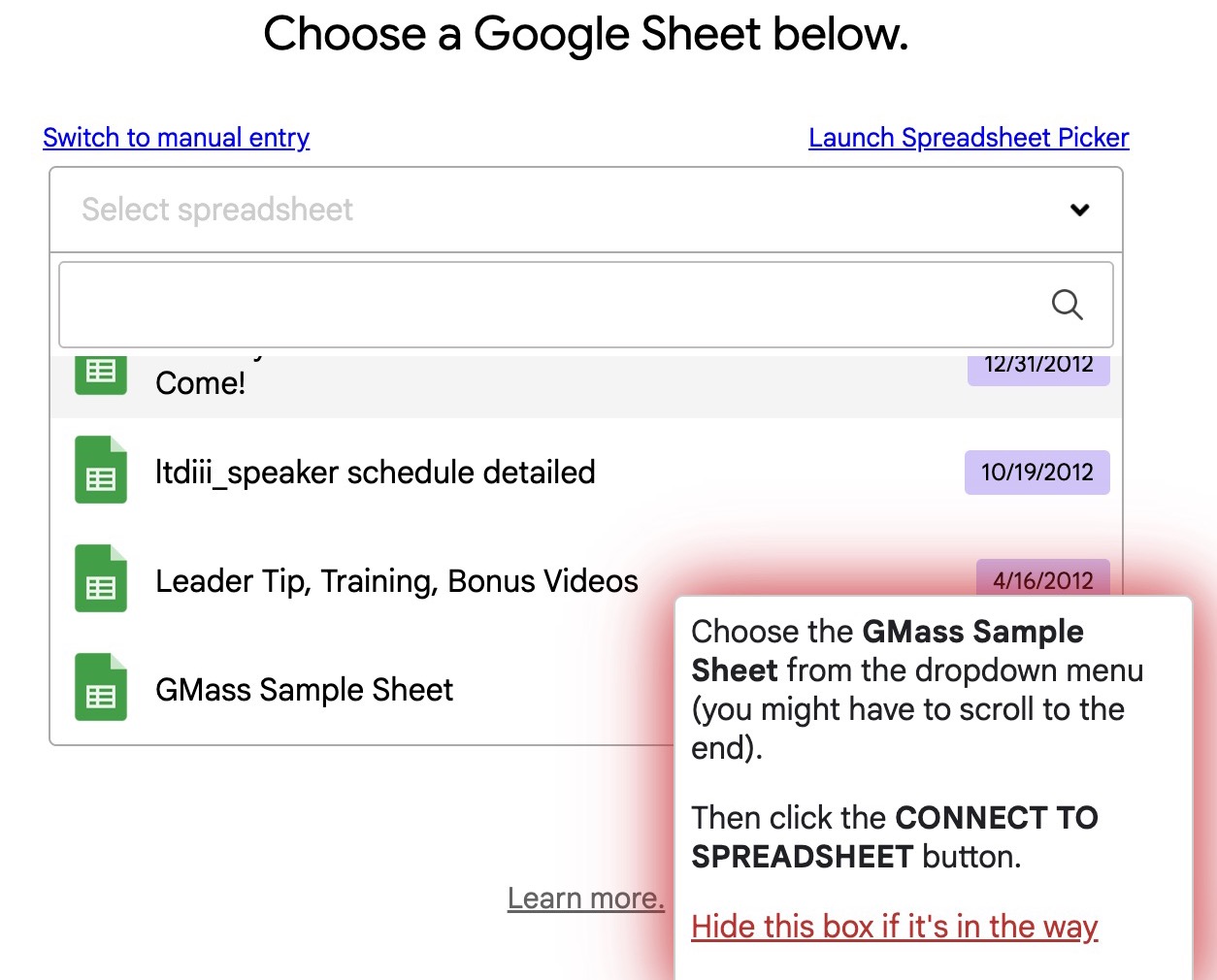
Nobody asks you for provenance. That’s the part worth understanding, because it cuts both ways: the absence of a gatekeeper is not the same as permission.
So the constraint moves. It stops being “will my provider allow this” and becomes “will Google tolerate my sending behavior, and am I inside the law.”
Both are real.
Let me take them in order.
The legal one, briefly, because it is not optional
In the United States, CAN-SPAM doesn’t require prior consent. It requires accurate headers and subject lines, a valid physical postal address in the message, a working unsubscribe honored within ten business days, and clear identification that the message is an ad. Cold email to a purchased list can be lawful under CAN-SPAM if you do all of that.
Outside the US, different answer. Canada’s CASL requires consent, express or implied, and the penalties aren’t theoretical. GDPR and the ePrivacy rules in Europe and the UK require a lawful basis, and “I bought a list” isn’t one for consumer contacts.
A CSV with no country column means you don’t know which rule applies to which row.
Sit with that for a second.
And there’s a plainer risk than any regulator. Purchased opportunity-seeker lists have been sold and resold for years. The addresses are old, the people were often opted in to something else entirely, and a meaningful share are now spam traps, addresses that exist only to catch people doing exactly what you’re about to do. Hit enough of those and your sending reputation is gone, whatever the law says.
What Actually Happens When People Push It
GMass carries 4.7 out of 5 on G2 across more than 1,300 reviews. It carries 3 out of 5 on Trustpilot across 36. Both numbers are real, and the gap between them tells you more than either one alone.
The G2 reviewers are solo operators running modest volume out of one inbox. They love it, and on that job it deserves the love.
The Trustpilot reviewers are mostly people who tried to scale. The recurring complaints: billing that kept charging after cancellation, support that couldn’t be reached, and Gmail accounts restricted after Inbox Rotation was switched on.
“For the past 3 months, I’ve been sending emails manually from my Gmail accounts - even up to 20-30 emails per day without any issues. But after connecting all my Gmail accounts to Gmass and using the Multi-Send option, I sent emails on the first day, and now on the second day, all 59 of my Gmail accounts have been restricted.”
Trustpilot review of gmass.co.
Fifty-nine accounts in forty-eight hours.
I can’t verify that person’s setup, and neither can you. Maybe the accounts were new. Maybe the list was filthy. But it isn’t an isolated report, and the pattern behind it is well documented: Google throttles on behavior, not on the published number.
So “unlimited sends” on the pricing page means unlimited from GMass’s side. Your real ceiling is Google’s, and it’s a fraction of the printed number.
To its credit, GMass doesn’t hide this. The asterisk on its own pricing page reads: “Breaking limits is dependent upon individual account configuration.” That’s a truthful sentence doing a lot of quiet work under an exclamation mark.
Read the asterisk. Always read the asterisk.
Can You Just Use A Free Gmail Account?
This comes up every time I explain the domain-and-Workspace setup to somebody, and the honest answer surprised me when I went and checked it.
Yes. A free @gmail.com account works with GMass and needs no domain verification at all, because Google already publishes SPF, DKIM and DMARC records for gmail.com itself.
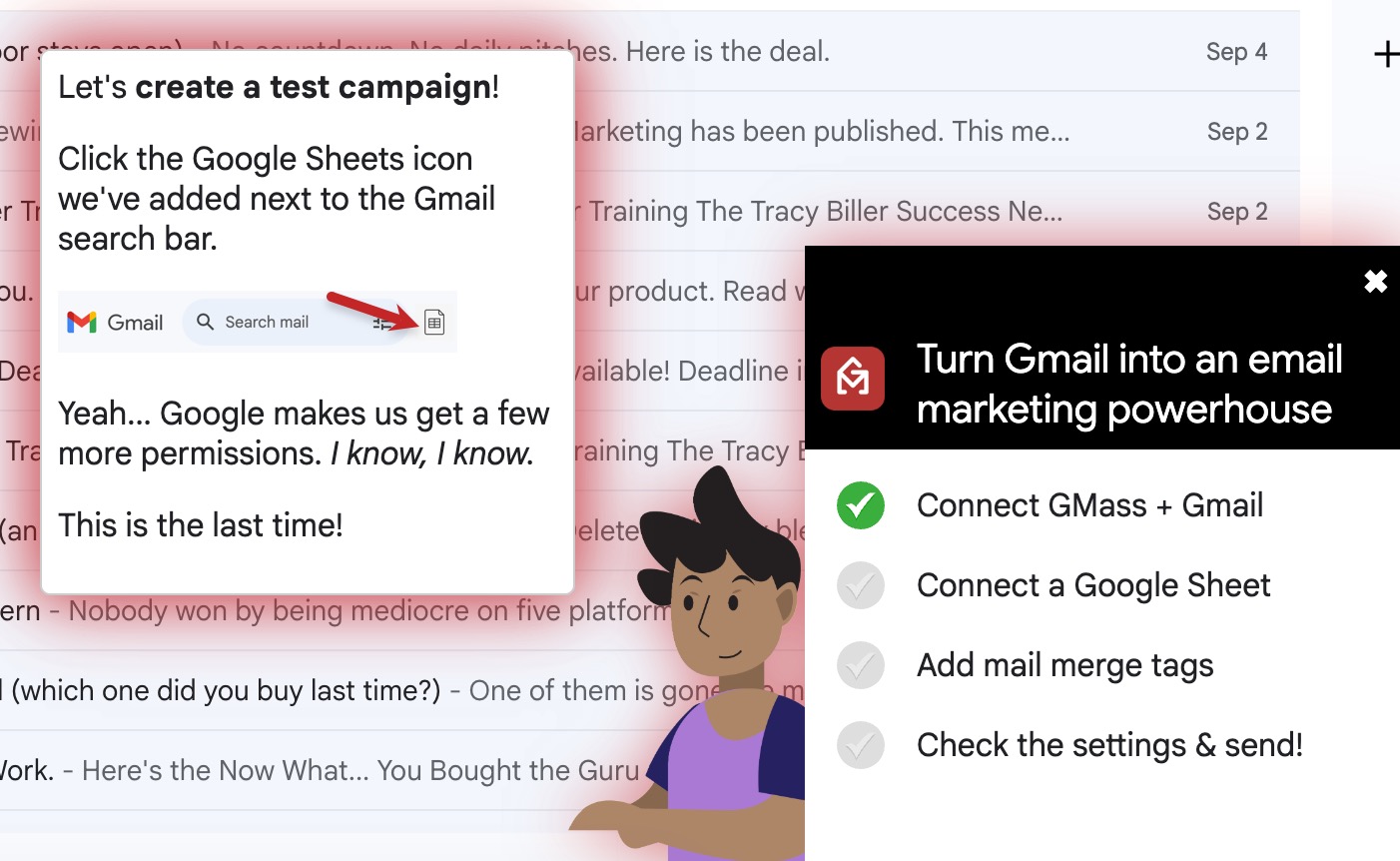
Four steps, and none of them is DNS.
Most guides tell you that you can’t authenticate a free Gmail address. Strictly speaking that’s true, you don’t own gmail.com, so you can’t edit its DNS. But it leads people to the wrong conclusion, which is that free Gmail therefore fails authentication.
It doesn’t.
Google does it for you.
“As a regular volume sender using a free Gmail account, you don’t have to do anything on the SPF/DKIM/DMARC front. Your Gmail messages will pass authentication because Google has those technical authentication records set up for you.”
GMass, on Google’s bulk sender guidelines.
There’s a second thing worth knowing, and almost nobody says it out loud. Google’s bulk sender rules, the 5,000-a-day DMARC-required ones from February 2024, apply only to mail sent to personal @gmail.com addresses. Google’s own FAQ states the guidelines don’t apply to messages sent to Workspace accounts. Prospecting business addresses? You’re unlikely to ever trip that threshold.
So the barrier people worry about mostly isn’t there.
What you actually give up
| Free @gmail.com | Workspace on your domain | |
|---|---|---|
| Setup before first send | None. Sign in and go | Domain, DNS, three records, propagation |
| Cost per inbox | $0 | $7.20/month plus the domain |
| Published daily cap | 500 | 2,000, but 1,500 for mail merge |
| SPF, DKIM, DMARC | Automatic, Google’s own | You configure it |
| What burns if it goes wrong | The Google account and everything in it | A throwaway domain |
| Trust signal on the From line | Weak | Strong |
That fifth row is the one to sit with.
When a Workspace sending domain gets burned, you throw the domain away. It cost you twelve dollars and was never connected to anything else. When a free Google account gets disabled for spam, you lose the account, and Google’s own policy page is explicit that the whole Google Account goes, not just Gmail. Drive, Photos, YouTube, anything you signed into with it. There’s an appeals process. It is neither fast nor certain.
So never test this with your real Gmail address. Trying the free route? Make a brand new account that holds nothing you’d miss. Not the one your family emails you on. Not the one your bank recovery goes to.
Google’s Program Policies prohibit using Gmail to distribute unsolicited commercial mail, and they prohibit creating multiple accounts to get around their policies. Read that second part carefully if you were planning to spin up ten free Gmails and rotate them. Ten fresh free accounts all sending the same campaign on the same day is the pattern their abuse detection was built to catch, and it is, more or less exactly, what happened to the person with fifty-nine restricted accounts.
And the deliverability side
You’ll land in spam more often. Not because authentication fails, it doesn’t, but because @gmail.com on a commercial pitch reads as a stranger with no business behind him. Real companies send from their own domain. Every filter knows that, and so does every prospect who looks at the From line for half a second.
A free address is also a brand new address with zero sending history, which is the condition under which people report getting throttled at twelve or fifteen a day.
Here’s how I’d actually use it. Free Gmail is a test lane, not a business. One fresh account, 20 to 30 sends a day, for one job only: finding out whether the list you bought contains real people. If a third of it bounces, you’ve learned that for the price of a subscription instead of a domain, a Workspace seat and three weeks of DNS fiddling. If it comes back clean and you get human replies, then go buy the domain and do it properly.
Use the cheap thing to answer the cheap question.
Don’t build on it.
The Cost Comparison Everybody Gets Wrong
Reviews compare GMass’s $29.95 to Mailchimp’s monthly fee and call it cheap. That’s the wrong comparison, because it leaves out the cost of the thing that makes GMass work at volume.
Inbox Rotation needs accounts to rotate through. Free gmail.com addresses work and cost nothing, per the section above. But at rotation volume, done properly, each inbox is a Google Workspace seat on a domain you own.
| Setup | GMass | Workspace seats | Total per month |
|---|---|---|---|
| Premium, one inbox | $39.95 | $7.20 | $47.15 |
| Professional plus 2 extra inboxes | $59.95 | $14.40 | $74.35 |
| Professional plus 5 extra inboxes | $59.95 | $36.00 | $95.95 |
Workspace Business Starter at $7.20 per user per month, Google’s published US rate. Domain registration on top.
Against an autoresponder that’s still competitive. A 10,000-contact list runs $100 or more a month at most providers, and they won’t let you upload a purchased list at any price.
But the honest framing is this: GMass at volume is not a $29.95 tool. It’s a $75 to $96 a month operation with several accounts to manage. That doesn’t appear on any pricing page, and neither does the rotation checking, the per-account open rates, the complaint monitoring, or the replies scattered across five inboxes.
What you’re really choosing between is whose reputation carries your mail. Send through your own Gmail and deliverability is largely inherited. You get Google’s infrastructure and Google’s trust, which is excellent, right up until your own behavior spends it. Send through a shared platform and you inherit whatever every other customer on that IP range did last week, which cuts both ways.
Neither is free.
One bills you in dollars and the other in risk.
I compare the broadcast-and-funnel end of this market in the systeme.io review, and it’s a genuinely different job. GMass is a scalpel for one-to-one outreach at volume. systeme.io is the whole kitchen.
Where The AI Actually Helps, And Where It Does Not
GMass ships an AI HTML template builder and full AI spintax, both added in the last year. Spintax is the one that matters here: it varies the wording of every message so a thousand sends don’t arrive as a thousand identical strings. That’s a genuine deliverability tool, not a gimmick, because identical bodies at volume are one of the patterns filters look for.
What AI won’t do is make a bought list into a warm one. It writes the email faster. It doesn’t change who you’re emailing or whether they asked.
Use it for variation and speed.
Not to send more.
Can You Actually Scale This?
Yes, within limits.
And only if you go slower than you want to. Here’s what I’d do, and the logic behind each step.
- Week 1, free. One throwaway Gmail, 20 to 30 sends a day, on the 7-day trial. This is the only free step and the trial’s shape decides it: 50 a day, seven days, 350 sends total. That is enough to answer the one question worth answering before you spend anything - is this list real? No DNS, no domain, no Workspace seat. A brand new Google account holding nothing you care about. Verify first, send small, count the bounces. Then the trial ends, and you decide with evidence instead of hope.
- Month 1, Premium at $39.95, one inbox, 25 to 50 sends a day. Not Standard, because without follow-ups you can’t measure anything properly. Now on a domain you own, with SPF, DKIM and DMARC set up before the first send. Verify the list and delete every address that fails. You’re not looking for sales yet, you’re looking for a bounce rate under 3% and replies that aren’t abuse.
- Month 2, same tier, same inbox, ramp to 100 a day. Add the follow-up sequence, two steps, spaced three and seven days. If bounces stay clean and you’re getting human replies, the list has something in it. If 30% bounce, stop. The list is dead and no tier fixes that.
- Month 3, only now consider Professional at $59.95. Add ONE second inbox on a second domain, warmed by hand for two weeks of normal human email before it touches a campaign. Rotate across two, 100 a day each. That’s 200 a day, roughly 4,400 a month at working-day pace.
- Month 4 and beyond, add one inbox at a time, never two. Each new one gets its own domain, its own authentication, its own two-week warm-up. Three inboxes at 125 a day is 375 daily, about 8,250 a month, which is more volume than most people in this business can follow up on properly anyway.
The mistake that produced the fifty-nine restricted accounts is doing step five on day one.
Is it passive?
No, and I want to be blunt about that, because “passive cold outreach plan” is a phrase that sells a lot of software.
The sending is automated. The list building, the warm-up, the reply handling, the unsubscribes, the per-account monitoring and the conversations that actually produce a signup are all manual. At three inboxes you’re looking at an hour a day, minimum.
You’re automating the typing, not the business.
Best Practice, If You Decide To Do This
- Never send from your main email address. Not your business domain, and not the personal Gmail your life runs through. Separate domain, or at minimum a throwaway account. If it burns, nothing you care about goes with it. This is the single highest-value rule here.
- Authenticate before the first send. SPF, DKIM and DMARC on every sending domain you own. Google and Yahoo have required this of bulk senders since 2024. On a free @gmail.com there’s nothing to do, Google has already published them.
- Verify, then delete. Run the list through verification and remove every failure before sending, not after. One Trustpilot reviewer verified 90 addresses, sent, and 30 bounced anyway. Verification reduces the risk. It doesn’t remove it.
- Warm every inbox for two weeks of normal two-way human email before it joins a rotation. An unwarmed inbox drags the whole campaign’s reputation down.
- Stay at 100 to 150 a day per inbox, whatever the published cap says.
- Put a real unsubscribe in every message and honor it immediately. GMass manages this automatically. Let it.
- Put your physical address in the footer. CAN-SPAM requires it. A PO box is fine.
- Watch the reply, not the open. Open tracking has been unreliable since Apple Mail Privacy Protection. Replies and bounces are the only numbers worth acting on.
- Cancel in the dashboard and check your card the following month. Billing after cancellation is the most common complaint on Trustpilot. Don’t cancel by email and assume.
Where This Falls Short
The architecture is the limit, and no tier upgrade fixes it. GMass rides your Gmail account, so your deliverability is one account’s reputation and your ceiling is Google’s behavioral tolerance. It doesn’t provision mailboxes, warm them, or monitor blacklists across a fleet of domains. Above roughly 5,000 sends a day, dedicated sending infrastructure is the right architecture and GMass is the wrong tool.
Your sending reputation and your business live in the same account. This is the real risk and it isn’t GMass’s fault. Spam complaints from a cold campaign land on the same identity that receives your invoices and your password resets. A dedicated cold-email platform isolates that blast radius. GMass deliberately doesn’t, because not isolating it is the whole product.
The support picture is genuinely mixed. High-priority support only exists at $59.95, and the Trustpilot complaints about unreachable support are frequent enough to take seriously.
Deliverability is yours to earn. GMass gives you Spam Solver and verification, and neither fixes a cold domain, missing authentication, or a list you bought. Tools don’t create sender reputation.
They just help you spend it faster.
I have never run this at volume. My own use was on a capped free account of 50 sends a day, which GMass does not offer today. Everything above about cost, limits and tiers is sourced from GMass’s and Google’s own documentation, and none of it is testimony. Judge this page on the citations, not on a testimonial, and if you want somebody who has spent real money sending real volume, that person isn’t me.
And the obvious thing about my own position. I earn a commission if you subscribe. The strongest recommendation on this page is to spend $39.95 rather than $59.95 unless you’re genuinely rotating inboxes, and the section above tells you to start on a free Gmail account that pays me nothing at all. Take that for whatever it’s worth to you.
Who This Is For, And Who It Isn’t
| If you are | Then |
|---|---|
| Not sure the list you bought is even real | A throwaway Gmail, 20 to 30 a day, until you’ve counted the bounces |
| Sending under 150 a day from one inbox to people who know you | Premium, $39.95. Follow-ups are the feature you need |
| Working a purchased CSV, willing to go slow and do the setup properly | Premium first, Professional at month three if the list proves out |
| Running 300+ a day across rotated inboxes you actually control | Professional, $59.95, plus Workspace seats. Budget $75 to $96 |
| Sending past Google’s mail merge ceiling of 1,500 a day | Wrong tool. You need dedicated infrastructure |
| Hoping to buy a list and mail it hard this week | Don’t. That’s the exact behavior that produced the restricted accounts |
Buying tools is a lot like buying rope. The cheap coil does the job fine until the day the load is heavier than you told it, and the thing that fails is never the part you were watching.
Read all that and GMass still fits the job? you can start the free trial here. That’s my affiliate link, so GMass pays me if you subscribe. Start on Premium. Prove the list before you pay for rotation you can’t use yet.
And whatever you send, what you claim in it is your problem, not the tool’s. If any of your outreach mentions income, the FTC rules on what affiliates can say apply to the email exactly as they apply to a blog post. The send button doesn’t change the standard.
Bless and be blessed,

GMass FAQs
What is the difference between the $29.95 and $59.95 GMass plans?
Two steps. The first $10 adds automated follow-up sequences, API access, A/B testing and triggered emails. The second $20 adds one thing, Inbox Rotation, which spreads a campaign across several connected Gmail accounts, plus high-priority support.
Is there a free GMass plan?
No. GMass offers a 7-day trial at 50 sends a day, no card required, with every feature unlocked. A trial runs out and a tier does not. Reviews that recommend a free GMass plan are out of date.
Can I use GMass with a free Gmail account instead of Google Workspace?
Yes, and it needs no domain verification, because Google publishes SPF, DKIM and DMARC for gmail.com itself. You are capped at 500 sends a day instead of 2,000, and the account itself is what you lose if Google disables it. Use a throwaway, never your real address.
Can I upload a purchased email list to GMass?
Mechanically yes, because GMass reads a Google Sheet and sends through your own Gmail, so no platform blocks the upload the way an autoresponder would. Legally it depends where recipients are. Practically, old purchased lists carry spam traps that destroy sending domains.
How many emails a day can I safely send with GMass?
Google publishes 2,000 a day for Workspace and 500 for free Gmail, but mail merge specifically caps at 1,500. Those are ceilings, not targets. High-volume senders report a practical safe range of 100 to 150 a day per inbox on a warmed account.
Does GMass get your Gmail account banned?
GMass is not the cause, Google's behavioral throttling is. But combining Inbox Rotation with an unclean list has produced documented restrictions, including one report of 59 accounts restricted inside 48 hours. Send from a separate domain, never your main business address.
Is GMass cheaper than an autoresponder?
At the same list size usually yes, since a 10,000-contact list runs $100 or more monthly at most providers. But at rotation volume GMass needs Google Workspace seats on top, which puts a realistic three-inbox setup nearer $81 a month than $59.95.
Sources
- GMass pricing page, per-tier feature matrix read from the page markup - checked Sep 11, 2026
- GMass, Upcoming Changes to GMass Pricing (Jan 2026) - checked Sep 11, 2026
- GMass, Sending limit of free accounts will change to 50 emails/day, carrying the note that free accounts are discontinued - checked Sep 11, 2026
- GMass Pricing FAQ, stating the trial is 7 days at 50 emails per rolling 24 hours with all features unlocked - checked Sep 11, 2026
- Google Workspace Admin, Gmail sending limits in Google Workspace - checked Sep 11, 2026
- Gmail Help, Email sender guidelines FAQ, stating the bulk rules do not apply to messages sent to Google Workspace accounts - checked Sep 11, 2026
- Gmail Program Policies, spam and bulk mail - checked Sep 11, 2026
- Google Account Help, Your account is disabled - checked Sep 11, 2026
- Trustpilot reviews of gmass.co, the quoted Gmail-suspension review - checked Sep 11, 2026
- GMass, on Google's bulk sender guidelines - checked Sep 11, 2026
- GMass team pricing sheet, per-seat team rates - checked Sep 12, 2026
- Google Workspace pricing, Business Starter $7.20 per user per month (US) - checked Sep 11, 2026